
How I turned a modest Mac mini, a local 27-billion-parameter language model, and a collection of open-source tools into a personal AI assistant that can search my email, browse the web, remember information, and maintain my notes.
Let me be blunt: I could never trust a cloud bot with my life.
I don’t mean asking ChatGPT a question, or letting Claude draft an email. I mean handing over the keys — my Gmail inbox, my credit card details, my passwords, my travel bookings, my private notes — to a service that lives on someone else’s servers, under someone else’s retention policy, and answers to someone else’s business model.
Whether it’s ChatGPT, Gemini, Dot, or any other cloud companion, the deal is the same: the more useful you let it become, the more of yourself you have to upload. One breach, one policy change, one quiet change in what gets stored and for how long, and the assistant that knew everything about you belongs to somebody else’s infrastructure.
I didn’t want to keep negotiating that tradeoff every time I asked for help. So I built my own.
Why I Wanted My Own Personal AI
We are living through an extraordinary period in artificial intelligence. Models like ChatGPT, Claude, and Gemini have demonstrated how powerful AI can be, but most of our interactions with them still happen inside someone else’s cloud. Our conversations, documents, and workflows are largely dependent on external services.
I wanted to explore something different: What if I could run my own capable AI assistant, on hardware I own, with access to my personal knowledge and tools, available around the clock? Not simply another chatbot, but a personal AI system that could search my emails, research information, maintain my notes, and gradually become more useful as it learns how I work. Privacy, control, independence from subscriptions, and the ability to experiment freely were all important motivations.
What surprised me most was how much I could accomplish with a relatively modest machine.
I named my assistant Sheru — Sheru means “little lion” in Urdu. A small machine, guarding its own territory, seemed like the right name for it.
The Most Surprising Part: It Runs on a 32GB Mac Mini
My setup runs on an Apple Mac mini M6 with just 32GB of unified memory.
No dedicated NVIDIA GPU. No expensive AI workstation. No 128GB memory configuration.
And yet, I can run a 27-billion-parameter language model locally, connect it to tools, and ask it to perform meaningful tasks involving my own information.
The heart of the system is:
- Mac mini M6, 32GB: The hardware hosting the system.
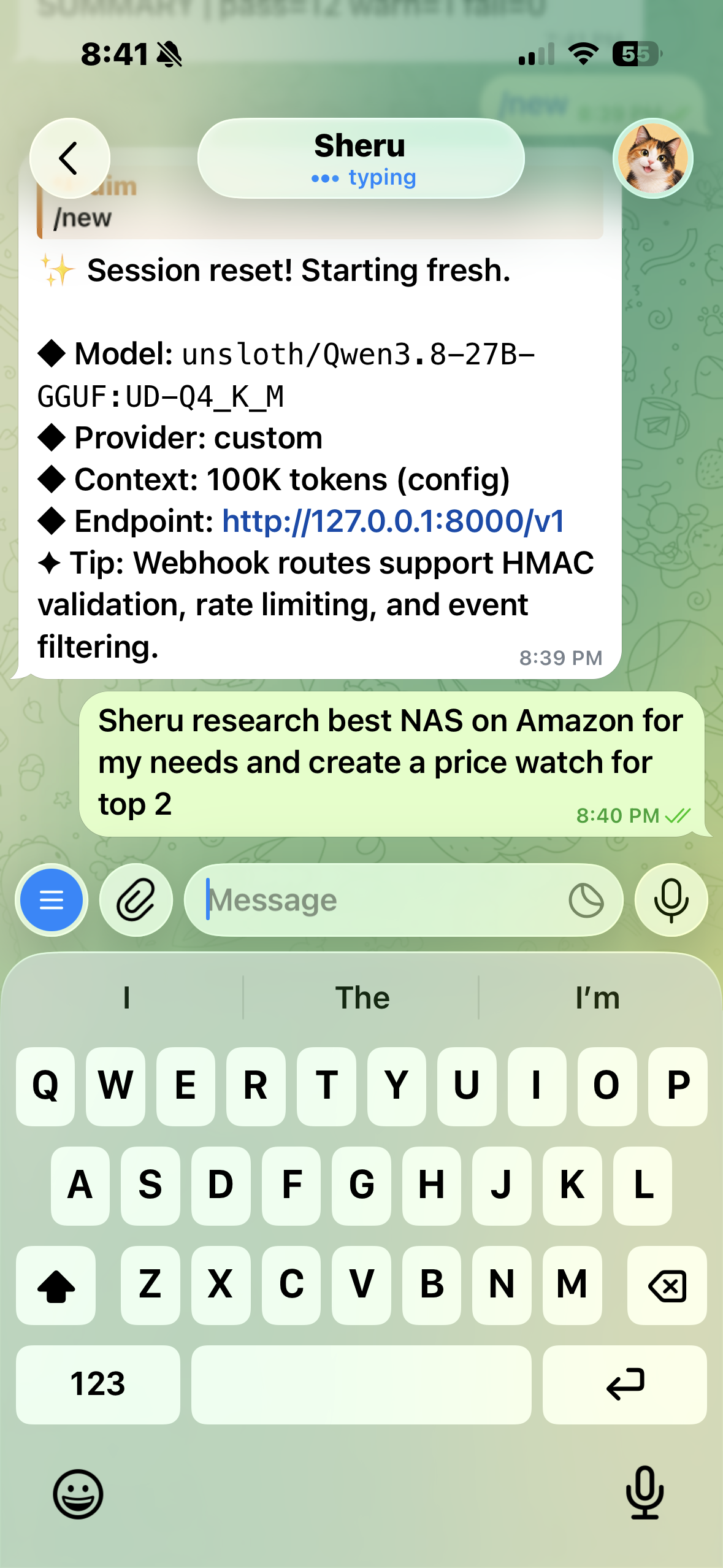
- Qwen3.8 27B: The local language model, using a 4-bit quantized version.
- Splash 1.3.2: The inference server responsible for running the model. It listens on
127.0.0.1:8000and is started by a launchd agent withKeepAliveandRunAtLoadenabled. - Hermes Agent v0.22.5: The orchestration layer that gives the model tools, memory, and the ability to execute tasks.
- SearXNG: A self-hosted web search engine.
- QMD: Local semantic and keyword search over my personal knowledge.
- Obsidian: My personal knowledge vault, synchronized across devices.
- Syncthing: Synchronization between my private Obsidian vault and the AI workspace.
- Gmail and Chrome: Access to email and browser-based workflows.
- Telegram: The conversational interface on my phone.
- Tailscale: Secure remote access to the Mac mini and its services.
I also configured OpenRouter as a possible cloud model option, subject to account credits and availability, and Claude Code for more demanding programming tasks.
My goal was not to replace the best cloud models. It was to discover how far a local AI system could go before needing them.
The Moment I Realized This Was More Than a Chatbot
One of my favorite experiments involved an upcoming trip.
I asked Sheru to help me with my travel arrangements.
Instead of manually opening Gmail, locating a confirmation email, searching airline websites, and updating my travel notes, I let Sheru handle the workflow.
It was able to:
- Access my Gmail and find the relevant travel confirmation.
- Extract the booking reference and flight information.
- Research the airline’s baggage policy using its web and browser tools.
- Bring the information together.
- Update the corresponding travel notes in my Obsidian knowledge vault.
All of this was orchestrated by Hermes using the local Qwen 27B model.
That was the moment it clicked for me.
The individual components were not especially revolutionary. Email search exists. Web search exists. Note-taking applications exist.
What was remarkable was seeing a locally running language model coordinate these capabilities and complete a useful task spanning multiple systems.
The model wasn’t simply answering a question. It was working with my personal information and updating my own knowledge base.
That is a fundamentally different experience from chatting with an LLM.
And much of the intelligence behind it was running right on my desk.
Another Thing I Did: Research NAS Drives on Amazon, Review by Review
A second, less glamorous example taught me something just as useful.
When my old Synology’s second disk started failing, I had to research a replacement NAS and new NAS drives — not from a spec sheet, but from what actual owners were experiencing. Star ratings don’t tell you that. The reviews do: the failure patterns, the noise complaints, the warranty stories, the drives that run hot in a small enclosure.
Amazon is famously hostile to bots and scrapers. Try to scrape it at scale and you get blocked fast. But Amazon doesn’t block a signed-in customer from browsing — and that’s the difference that mattered here. Browsing as me, in a browser logged into my own account, at a normal pace, I could go through the reviews properly, page by page, and pull out the patterns instead of just skimming the top few.
That’s a quiet advantage of an agent that browses as you, rather than a cloud bot trying to fetch a site from the outside. The cloud bot gets stopped at the door. A browser session that’s already yours just walks in and reads.
It didn’t make the NAS decision for me — that choice, between the Synology and the UGREEN route, is still a tradeoff of software polish versus hardware value. But it gave me the kind of evidence I actually trust to make it: not a summary of a summary, but what owners said, in their own words, across a lot of reviews.
Building Sheru: A Step-by-Step Guide
Here is the architecture I eventually arrived at and the major steps involved in building it.
Step 1: Prepare the Mac Mini
I decided to use a dedicated macOS account named sheru to run the AI environment.
This provides separation between my regular personal account and the processes, applications, and credentials used by the agent.
My primary workspace is:
/Users/sheru/sheru-workspace
The workspace contains the information and files Sheru is allowed to work with.
For local agents, I highly recommend starting with a dedicated account and explicitly deciding which directories and applications the agent should access.
Because Sheru can execute terminal commands, browse websites, and work with files, security is a practical concern, not an abstract one.
What this unlocks: An independent environment where the assistant can work without automatically having access to everything in my personal macOS account.
Step 2: Run Qwen 27B Locally with Splash
I experimented with multiple ways of running local models, including Ollama and LM Studio.
These were useful for testing models and understanding memory consumption, context sizes, and inference speeds.
Eventually, I moved to serving Qwen through Splash 1.3.2.
My model launch command is:
splash serve \
  --model unsloth/Qwen3.8-27B-GGUF:UD-Q4_K_M \
  --max-context 100K
Splash listens on:
127.0.0.1:8000
I also configured a macOS launchd agent to start Splash automatically, using RunAtLoad and KeepAlive so that the service can start when loaded and be restarted if it exits.
The model uses 4-bit quantization, which significantly reduces its memory footprint compared with full-precision weights.
That is important on a machine with only 32GB of unified memory.
Apple Silicon’s unified memory architecture means the CPU and GPU share the same memory pool, allowing the GPU to access much larger models than would fit in the dedicated VRAM of many consumer GPUs.
The key is balancing model size, context length, and memory pressure.
I configured a maximum context of 100K tokens, although that does not mean every request should use such a large context.
Some lessons from my experiments:
- A 27B model is capable enough for useful multi-step agent tasks.
- Quantization makes running it on 32GB practical.
- Large contexts can dramatically increase processing time and memory pressure.
- Long-running conversations need regular compression or fresh sessions.
- Local inference is noticeably slower than frontier cloud models, especially when the model generates lengthy reasoning.
My typical multi-step tasks can take a few minutes rather than a few seconds.
For personal workflows, I often find that perfectly acceptable.
What this unlocks: A capable local reasoning model that can handle private information without sending every prompt to a cloud inference provider.
Step 3: Install Hermes — The Agent’s Brain and Hands
A language model by itself is not a personal assistant.
It needs the ability to use tools, manage conversations, access information, and execute actions.
For this, I chose Hermes Agent from Nous Research.
Hermes provides an agent framework with terminal access, file operations, browser capabilities, persistent memory, reusable skills, and messaging integrations.
My setup uses Hermes Agent v0.22.5, installed as a Git checkout at:
~/.hermes/hermes-agent
For a fresh installation, check the current Hermes documentation for the supported installer command rather than relying on an unverified installation URL.
After installation, the setup command is:
hermes setup
I configured Hermes to use the local inference endpoint exposed by Splash.
Model selection can be accessed through:
hermes model
My model configuration is:
model:
  default: "unsloth/Qwen3.8-27B-GGUF:UD-Q4_K_M"
  context_length: 100000
  provider: "custom"
  base_url: "http://127.0.0.1:8000/v1/"
For the default Hermes profile, the configuration file is:
~/.hermes/config.yaml
Named profiles keep their own configuration files under:
~/.hermes/profiles/<name>/
I also configured Hermes’s terminal working directory to point to the Sheru workspace:
terminal:
  backend: "local"
  cwd: "/Users/sheru/sheru-workspace"
An important distinction: setting the working directory does not create a security sandbox. The operating system account permissions and Hermes tool controls still determine what the agent can access.
What this unlocks: Qwen is no longer just generating text. It can decide to search, inspect files, run commands, use tools, and work toward completing a task.
Step 4: Give Sheru Its Own Web Search Engine
A personal AI assistant needs access to current information.
Rather than making Sheru entirely dependent on commercial search APIs, I deployed SearXNG using Docker.
SearXNG is a self-hostable metasearch engine that can aggregate results from multiple search sources.
My local instance runs at:
http://localhost:8888
I enabled JSON output so that the search service could be consumed programmatically.
The essential SearXNG settings are:
use_default_settings: true

server:
  secret_key: "GENERATE_YOUR_OWN_SECRET"
  image_proxy: true

search:
  formats:
    - html
    - json
The service can be tested with:
curl -fsS \
  "http://127.0.0.1:8888/search?q=AI&format=json"
The next step is connecting this endpoint to a suitable Hermes web-search tool or custom tool wrapper. Running SearXNG alone does not automatically make Hermes use it.
For restart resilience, the Docker container uses the unless-stopped restart policy:
docker update --restart unless-stopped searxng
On my machine the container is named searxng and already has the unless-stopped restart policy, so this command is only needed on a fresh setup.
Docker Desktop must also start successfully for the container to restart. Its automatic launch at account login should be verified in the macOS login items or Docker Desktop settings.
What this unlocks: Sheru can obtain current information, research topics, and look up external sources instead of relying exclusively on the model’s training knowledge.
SearXNG still sends searches to external search engines, so self-hosting the service is not the same as fully offline browsing.
Step 5: Give Sheru Long-Term Knowledge with Obsidian and QMD
This was one of the most interesting architectural decisions.
I already use Obsidian to maintain personal notes, project information, travel plans, and other reference material.
Instead of building a completely separate AI memory database, I wanted Sheru to interact with my existing notes.
My approach combines:
Obsidian for human-readable, durable knowledge and QMD for local retrieval over those documents.
QMD supports local search and indexing, allowing the agent to retrieve relevant information without placing the entire vault into the model’s context.
QMD runs as a local stdio MCP server that Hermes launches itself using:
qmd mcp
The integration is configured in Hermes’s config.yaml. No separate HTTP service is needed.
The regular index maintenance commands are:
qmd update
qmd embed
I scheduled them through cron:
SHELL=/bin/zsh
PATH=/opt/homebrew/bin:/usr/local/bin:/usr/bin:/bin

*/15 * * * * { /opt/homebrew/bin/qmd update && /opt/homebrew/bin/qmd embed; } >> ~/logs/qmd-index.log 2>&1
This keeps the indexed collection refreshed approximately every 15 minutes, assuming the jobs complete successfully.
The cron job uses the same QMD command-line tools to refresh the index, while Hermes launches the MCP server as needed.
It is also worth remembering that search and editing are different capabilities.
QMD helps Sheru find the right notes. Filesystem permissions and file-operation tools allow it to read or modify them.
What this unlocks: Sheru can search existing knowledge, recover project context, find relevant notes, and use that information to answer questions or update documents.
This is especially valuable when the alternative is repeatedly copying and pasting information into AI chat windows.
Step 6: Synchronize the Obsidian Vault with Syncthing
This turned out to be trickier than I expected.
My original Obsidian vault was stored in iCloud under my regular macOS account. Sheru, however, runs under its own account.
Even when a symbolic link pointed to the vault, macOS permissions and iCloud’s protected directories prevented reliable access to the underlying files.
I experimented with filesystem permissions, directory access, and account separation.
Ultimately, the cleaner approach was synchronization rather than forcing direct access into another account’s iCloud container.
I used Syncthing to synchronize my knowledge vault into Sheru’s workspace.
The architecture became:
Personal Mac Account
        |
    Obsidian Vault
        |
      iCloud
        |
    Syncthing
        |
Sheru Workspace
  /knowledge
        |
    QMD Index
        |
      Hermes
Sheru now works with a local synchronized copy:
/Users/sheru/sheru-workspace/knowledge
My knowledge folder is also a Git repository, so every change has a commit history that can be restored.
I also configured Syncthing to start under the appropriate account using macOS launchd.
The result is an elegant division of responsibilities: Obsidian remains my primary note-taking application, while Sheru operates on the synchronized knowledge directory.
There is one important caveat: file synchronization and QMD indexing are separate processes. A changed note must sync successfully before the search index can incorporate it.
And because synchronization can propagate deletions and accidental edits, version history and backups remain essential.
What this unlocks: A living personal knowledge base that both I and the AI can work with, instead of isolated notes trapped in different applications.
Step 7: Connect Gmail and Chrome
These integrations transformed Sheru from an interesting technical experiment into something practically useful.
I connected my Gmail account so Hermes could locate emails containing relevant personal information.
That includes travel confirmations, booking references, receipts, and other information that would otherwise require manual searching.
I also enabled browser access through Chrome so Sheru could interact with websites and research external information.
Together, these tools create much more powerful workflows than either could provide separately.
For example:
User asks a question
        |
Hermes interprets the request
        |
Search Gmail for relevant email
        |
Extract booking information
        |
Search airline baggage policy
        |
Open source in browser if needed
        |
Summarize the findings
        |
Update the appropriate travel note
This workflow was the inspiration for my favorite Sheru experiment.
One important nuance: the underlying model can remain local while tools such as Gmail and Chrome interact with external services. Authentication and network access must still be configured, and only the permissions actually needed should be granted.
I prefer allowing the agent to search and read before gradually enabling actions that modify external systems.
For sensitive or irreversible operations, I want explicit approval.
What this unlocks: An assistant that can connect information across email, websites, and my personal files.
Step 8: Use Telegram as the Interface
A personal assistant is much more useful if it is accessible without sitting in front of a computer.
For Sheru, I chose Telegram.
I created a Telegram bot through BotFather and connected it to the Hermes messaging gateway:
hermes gateway setup
After configuration, I can message Sheru directly from my phone.
The experience feels very different from opening a terminal on the Mac mini.
I can ask it to look something up, retrieve notes, or perform a workflow while I am away from home.
The requests reach Hermes on the Mac mini, where the agent can use the local model and configured tools.
Telegram becomes the interface; the Mac mini provides the compute and execution environment.
Of course, Telegram messages travel through Telegram’s infrastructure. Running the model locally does not make the messaging channel entirely private.
What this unlocks: An always-accessible personal assistant that can receive requests from my phone and work with local resources at home.
Step 9: Add Tailscale for Secure Remote Access
Although Telegram is convenient for everyday tasks, I also wanted to access the Mac mini and Hermes dashboard remotely.
I installed Tailscale on the Mac mini. On the Mac mini it runs under my personal macOS account rather than the sheru account.
Access from my MacBook Air is also part of the intended remote workflow, although the client installation on that device should be confirmed before publishing.
Tailscale provides a private network between authorized devices, avoiding the need to expose local services through public router ports.
This allows me to remotely access the dashboard and administer the machine.
I still keep service authentication, firewall rules, and local permissions in place. A private network should be an additional security layer, not a replacement for access controls.
What this unlocks: Remote access to the system without publicly exposing the AI endpoints.
Step 10: Make the Entire System Survive a Reboot
Once Sheru became useful, reliability became increasingly important.
I didn’t want to discover that the assistant had stopped working because a terminal window closed or the Mac restarted.
I therefore started moving long-running components into persistent services.
On macOS, I used launchd, Apple’s service manager, for components that need to run automatically under the appropriate account.
The services I focused on included:
- Splash for local model inference.
- Hermes gateway for messaging.
- Syncthing for knowledge synchronization.
- Docker and its SearXNG container.
- Scheduled QMD indexing through cron.
For Splash, the launchd agent has both RunAtLoad and KeepAlive enabled.
For Docker, the SearXNG container has the unless-stopped policy, although Docker Desktop’s own automatic startup needs to be checked.
For Hermes, some of the useful service-management commands are:
hermes gateway status
hermes gateway start
hermes gateway restart
I encountered a particularly interesting issue: Hermes could access the knowledge folder when launched manually, but the service-managed process sometimes could not.
That reinforced an important lesson about macOS.
Running a process under the right username does not always mean it has identical access to protected resources.
The launch context, macOS privacy controls, filesystem permissions, and access to iCloud-managed directories all matter.
Using a local synchronized knowledge directory reduced this complexity.
Another important limitation: per-user LaunchAgents generally start when that user logs in. They should not be confused with system-wide daemons that can start before login, particularly on a Mac using FileVault.
What this unlocks: A more dependable assistant, with services designed to recover from process failures and normal restarts rather than requiring manual terminal commands.
Step 11: Add Health Checks and Failure Notifications
I recently added another layer: a custom system-doctor skill.
The idea is simple.
Sheru depends on multiple components, and any one of them can fail.
The health check runs from cron at 08:00, 14:00 and 21:00.
Its latest run reported:
- 12 passes
- 1 warning
- 0 failures
The checks cover:
- The Hermes gateway LaunchAgent.
- The Splash HTTP endpoint.
- The QMD executable and collections.
- SearXNG on port 8888 and its restart policy.
- Readability of the knowledge folder.
- Disk, uptime, and load information.
My preferred behavior is to remain silent when everything is healthy and generate a notification only when a failure is detected.
For example:
Run health checks periodically.

If all checks pass:
    Produce no notification.

If something fails:
    Identify the failing component.
    Capture useful diagnostic details.
    Generate a failure alert.
Telegram is the intended notification channel, although delivery of failure alerts through that channel still needs to be verified.
This is a useful application of the assistant’s own infrastructure: the monitoring is designed to tell me when the AI system needs attention.
Monitoring and recovery are separate concerns, however. Automatic restarts handle some failures; health checks help detect problems that restarts alone cannot solve.
What this unlocks: Greater confidence that Sheru is available when needed and that unexpected failures won’t go unnoticed.
A Simple View of the Architecture
             MY PHONE / REMOTE DEVICE
                      |
               Telegram / Tailscale
                      |
                      v
                HERMES AGENT
                (v0.22.5)
           Tools, Memory, Skills
                      |
          +-----------+-----------+
          |           |           |
          v           v           v
      LOCAL LLM     SEARCH      PERSONAL
      Qwen 27B      SearXNG       TOOLS
      Splash 1.3.2     |            |
      127.0.0.1:8000   |       +----+------+
          |            |       |           |
          |            |     Gmail       Chrome
          |            |
          +------------+-----------+
                       |
                       v
                  KNOWLEDGE
              QMD (stdio MCP)
                Local Files
                       |
                   Syncthing
                       |
                 Obsidian Vault
                       |
                     iCloud

             Knowledge Git History

        Supporting infrastructure:
           launchd + Docker + cron
        Health checks + failure alerts

        Optional external intelligence:
           OpenRouter + Claude Code
The architecture is intentionally modular.
I can replace the local language model without rebuilding the knowledge system. I can change the search backend independently. I can use a more powerful cloud model when necessary, while retaining the same Hermes tools and workflows.
That flexibility is one of the advantages of building with loosely coupled components.
What About Performance?
The most common question is whether a 27B model is actually usable on a 32GB Mac.
My answer is yes, with reasonable expectations.
I have found Qwen 27B capable of handling meaningful tool-driven workflows. It can interpret instructions, search for information, invoke tools, and work with documents.
However, performance is not comparable to the fastest cloud systems.
In my experience, multi-step tasks often take approximately two to five minutes, particularly when the model spends substantial time generating reasoning tokens.
Long conversations and large prompts can slow things down further.
I also discovered that configuring an enormous context window is not automatically an improvement.
Even when a model supports a large context, keeping the active conversation compact is often better for latency and memory consumption.
This led me to pay more attention to conversation compression, retrieval, and prompt size.
The design principle I now follow is:
Retrieve the information the agent needs instead of putting everything into the context window.
That is where QMD and the external knowledge vault become valuable.
For coding-intensive tasks or situations demanding more sophisticated reasoning, Claude Code remains an option. OpenRouter is also configured as a potential cloud route, with actual availability depending on the account’s credits.
The local model handles suitable personal tasks; cloud models remain an option for harder workloads.
The 32GB vs 128GB Question
This was the decision I spent the most time on, and it is the one readers ask about first — so let me be specific about what I gave up, and what I didn’t.
Apple Silicon memory is not upgradeable after purchase. Once I chose 32GB, that was the machine for the next few years. That irreversibility is exactly why I didn’t treat this as “buy the cheap one and see.”
What 128GB would have bought me
On a 128GB machine, the constraints below mostly disappear. I could run Qwen 27B at 8-bit instead of 4-bit, keep a much larger context resident alongside the full Hermes stack, and keep several models loaded at once — the 27B brain, a smaller RAG generator, and a GUI grounder — without unloading one to make room for another. It would also leave real headroom for larger models in the future, including quantized 70B-class models that are simply not a realistic resident option on 32GB.
In short: 128GB buys comfort, headroom, and future-proofing. It does not buy a frontier model. Even a well-provisioned local machine is still slower and less capable at open-ended reasoning than the best cloud models, and no amount of RAM changes that gap on its own.
What 32GB actually fits — and where it pinches
The math that settled it for me was this, with the full stack resident:
- Qwen3.8-27B at 4-bit: roughly 15–18GB of weights, about 21–22GB working at 32K context
- Hermes plus its MCP servers: 2–3GB
- An embedding model: 1–2GB
- SearXNG, macOS, and headroom: the rest
That totals roughly 30–32GB. In other words, it fits — but it is full. An 8-bit version of the same model, at roughly 30GB of weights and 33–34GB working, does not fit at all.
The other pinch points are just as concrete. Qwen3.8’s hybrid architecture keeps its KV-cache cost surprisingly low at larger contexts — 64K costs only about 4GB extra, because most of its layers use Gated DeltaNet linear attention — but macOS, Hermes, and MCP overhead still leave little room beyond about 32K with everything resident. The native 262K context is not realistic on this machine. A 64K session, the GUI grounder (about 5GB), or a separate RAG generator are all possible, but on demand: unload something first, then load them.
That sounds like a limitation, and it is. But it is a manageable one, because most personal-agent work is not context-hungry. It is retrieval-hungry. A travel workflow needs the right booking email and the right note, not a 100K-token conversation. Once I designed around retrieval — QMD first, compact prompts, regular compression — the 32GB ceiling stopped being the thing that blocked useful work.
Why I chose 32GB anyway
Three reasons, in order.
First, price and proportion. The M6 mini came in around $1,299–$1,499. The Mac Studio path I had briefly held — a 64GB M5 Max at $3,799, which I returned unopened — was already more than double that, and 128GB would have been more again, for a machine whose main job is background agent loops, not rendering or training. The money saved buys a very long time’s worth of cloud API calls for the tasks where cloud models genuinely earn their keep.
Second, the bottleneck that matters most to me is not memory, it is token speed and reasoning quality on hard tasks. A bigger local machine would still leave me waiting minutes on long reasoning, and still behind frontier models on novel coding. Paying several thousand dollars to make the local tier somewhat more comfortable, while still needing the cloud for the hardest work, felt like paying twice for the same gap.
Third, the mini fits the job: small, quiet, low-power, and meant to stay on. Sheru is supposed to be an always-on assistant, not a workstation I sit at. A compact machine I can leave running fits that role better than a Studio I would be over-provisioning for background loops.
If your goal is different — if you want to run multiple large models simultaneously, work with very large contexts all day, or keep a 70B model resident — 128GB is the honest answer, and 32GB will frustrate you. For a single 27B agent brain plus retrieval, 32GB is enough, provided you accept the on-demand loading and the compression discipline that come with it.
Local for Private Work, Cloud for Coding — On Purpose
My original instinct was simple: keep everything local, send nothing to a cloud model. That instinct is still where I start, but it is no longer an absolute rule. Somewhere along the way I reframed the goal, from “the most private agent possible” to “the most useful, capable always-on agent I can run for four or five years, with privacy as a real tradeoff rather than a hard constraint.”
That reframing is what makes the split below deliberate instead of accidental.
The local tier: where my personal life lives
Email, notes, travel plans, project context, and the day-to-day orchestration of Sheru all stay local. That is the data that is continuous, cumulative, and hardest to take back once shared — an inbox is not one prompt, it is years of context. Running Qwen locally means those workflows do not need to send my personal information to a cloud inference provider for every lookup, summary, or note update. It also means zero marginal inference cost for the tasks Sheru does most often, and no subscription standing between me and my own assistant.
This is the private tier, and it is the point of the whole experiment. If a workflow only needs my own information and a capable-enough model, it stays here.
The cloud tier: where the reasoning gap is largest
Coding is the exception I made on purpose. I use Claude Code, and OpenRouter as a secondary cloud route, for demanding programming work. The reason is blunt: for novel, multi-file coding, the frontier models are simply in a different class right now — better at planning, better at catching their own mistakes, and faster to iterate with. That is also where the local model’s slowness hurts most, because coding is interactive in a way that a background travel lookup is not.
Crucially, coding tasks are also more containable than personal-agent tasks. I can choose what code and context to send for a given task, in a way I cannot choose to send “only a little bit” of my inbox or my notes history. That containment is what makes the tradeoff acceptable to me: the cloud sees a bounded work item, not the running record of my life.
My rule of thumb now is: default to local, escalate to cloud when the task is coding-heavy, reasoning-heavy, or time-sensitive — and keep asking which tier a new workflow belongs to before I enable it, rather than drifting into the cloud by default.
I should also be honest about what “local” does not mean here. Telegram messages travel through Telegram’s infrastructure. SearXNG queries go out to external search engines. Gmail and Chrome are, by definition, external services. The model running on my desk is private; the whole system is not hermetically sealed, and anyone reproducing this should not claim otherwise. The privacy win is narrower and more useful than that: the brain that reasons over my personal data, session after session, lives in my house.
That split — a real private tier for personal work, plus cloud intelligence where it earns its keep — is what lets a 32GB mini be enough. Without the local tier, I would just be renting another chatbot. Without the cloud tier, I would be pretending a 27B model can do everything a frontier model can. Together, they cover more than either could alone.
What I Learned
Building Sheru taught me several things about personal AI systems.
First, local AI is more capable than I expected.
I initially wondered whether 32GB would be too restrictive. It certainly creates constraints, but it has been enough for a useful agent based on a quantized 27B model.
Second, tools can matter as much as the model.
A model without access to your information can only respond to what you type. Give that same model appropriate access to search, email, browser tools, and files, and its usefulness increases dramatically.
Third, personal knowledge is an important part of the system.
The combination of Obsidian, synchronization, and local search creates continuity between sessions. The assistant does not need to rely exclusively on a single long conversation to recover useful context.
Fourth, security and reliability become part of AI engineering.
As soon as an agent can read private files and execute commands, permissions matter. When it becomes something you depend on, process management, backups, health checks, and monitoring matter too.
Finally, the best architecture does not have to be entirely local or entirely cloud-based.
I like having a local-first foundation with the ability to use cloud intelligence selectively.
That gives me flexibility without making every personal task dependent on a remote model.
What’s Next for Sheru?
I am still experimenting.
Some of the areas I want to explore further include better automatic session management, more efficient local inference, scheduled research workflows, improved personal memory, and additional capabilities through Hermes skills.
I am particularly interested in turning repeated personal workflows into reusable skills.
For example, a travel-assistant skill could retrieve confirmation emails, verify itinerary details, research relevant policies, and maintain the appropriate travel document.
A personal knowledge skill could periodically review new notes, organize information, and identify unfinished projects.
A system-maintenance skill could diagnose infrastructure problems and recommend—or, with approval, execute—repairs.
The possibilities become much more interesting once the assistant has a useful collection of tools and a durable knowledge base.
Final Thoughts: A Glimpse of Personal AI’s Future
What fascinates me most about Sheru isn’t any single model or tool.
It is that the pieces are finally coming together.
A compact desktop computer can run a capable language model. Open-source agent frameworks can give it tools and persistent workflows. Personal knowledge can remain in ordinary Markdown files. Secure networking and messaging platforms make the system available from almost anywhere.
And all of this can be assembled without building a massive AI infrastructure.
The experience of asking Sheru to find a booking reference in my email, research baggage rules, and update my travel notes made this tangible.
That was not a benchmark result or a carefully crafted demonstration. It was a real task I wanted to get done.
It took multiple tools, a locally running model, and a bit of patience—but it worked.
For me, that’s the real promise of personal AI: not simply having a model that knows a lot, but having an assistant that can work with the information and tools that matter to you.
And the fact that I can do this on a 32GB Mac mini is what makes it so exciting.
Sheru is an ongoing personal experiment. The architecture and commands above describe my October 2026 setup. Actual setup details and compatibility may differ by software version. In particular, hardware specifications, model identifiers, runtime endpoints, permissions, and agent tool configurations should be verified before reproducing the system.